
Dodge Journey: Fascia, front
REMOVAL
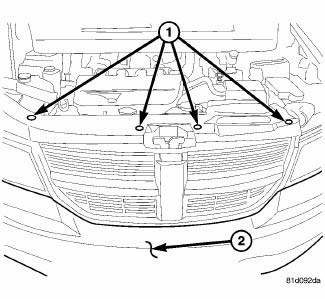
Fig. 1: Pushpins
1. Release hood latch and open hood.
2. Remove the pushpins for the fascia (2) at the radiator support.
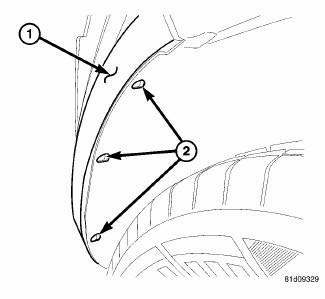
Fig. 2: Pop Rivets
3. Hoist and support vehicle on safety stands.
4. Remove the pop rivets (2) at the wheel well opening.
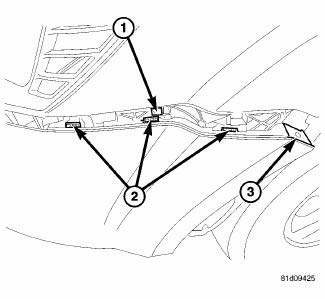
Fig. 3: Fascia Tabs & Bracket
5. Remove the Torx screw (3) at the wheel well housing.
6. Separate the fascia tabs (2) at the bracket (1).
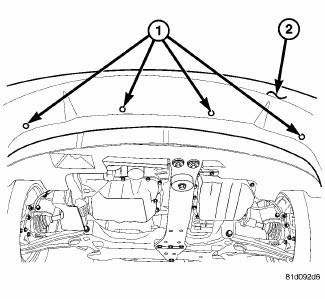
Fig. 4: Lower Pushpins
7. Remove the pushpins (1) for the fascia (2) at the lower closeout panel.
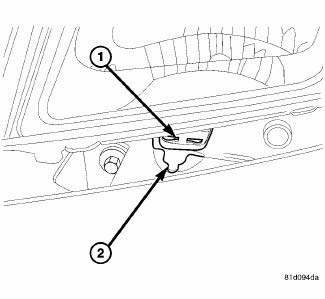
Fig. 5: Fascia & Mounting Tab
8. Slide the fascia (2) out from the mounting tab (1) under the headlamp.
9. Disengage fog lamp wire connector and side marker connector from body harness, if equipped.
10. Disengage the ambient temp sensor wire connector, if equipped.
11. Remove fascia from vehicle.
INSTALLATION
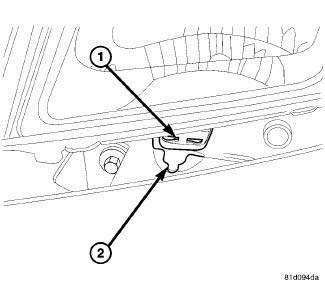
Fig. 6: Fascia & Mounting Tab
1. Install the fascia to the vehicle.
2. Reconnect the ambient temp sensor wire connector, if equipped.
3. Reconnect the fog lamp wire connector and side marker connector from body harness, if equipped.
4. Slide the fascia (2) into the mounting tab (1) under the headlamp.
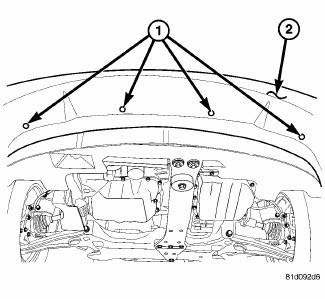
Fig. 7: Lower Pushpins
5. Install the pushpins (1) for the fascia (2) at the lower closeout panel.
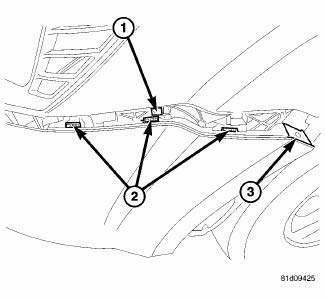
Fig. 8: Fascia Tabs & Bracket
6. Insert and snap into place the fascia tabs (2) at the bracket (1).
7. Install the Torx screw (3) at the wheel well housing.
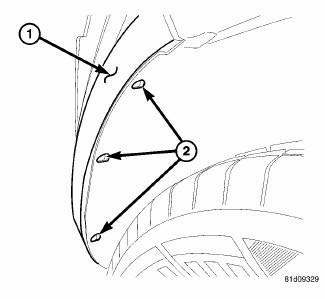
Fig. 9: Pop Rivets
8. Install the pop rivets (2) at the wheel well opening.
9. Lower the vehicle.
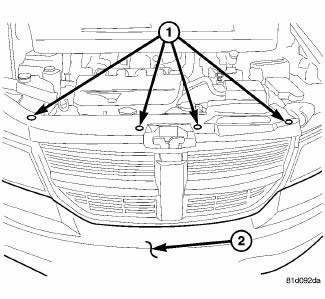
Fig. 10: Pushpins
10. Install the pushpins for the fascia (2) at the radiator support.
11. close the hood and check for proper fit.
 Bumpers
...
 Fascia, front lower, closeout
REMOVAL
Fig. 11: Lower Fascia
1. Remove fasteners (5) to lower closeout.
Fig. 12: Push Pins - Front Lower Fascia
2. Remove push pins (1) to lower closeout.
3. Remove the front lower fascia.
...
See also:
Description
The base brake system consists of the following components:
Brake pedal
Power brake booster
Master cylinder
Brake tubes and hoses
Disc brakes (four-wheel)
Brake lamp switch
Brake fluid ...
Disassembly, Assembly
Disassembly
NOTE: Before disassembling the brake caliper, remove it from the
vehicle.
NOTE: Before disassembling the brake caliper, clean and inspect it.
WARNING: Under no condition sh ...
Installation
CAUTION: To prevent damage to the plastic evaporator tube bracket,
carefully guide
the heater core tubes past the bracket during installation of the heater
core.
Fig. 278: Re ...
