
Dodge Journey: Module, satellite video
REMOVAL
1. Disconnect and isolate the negative battery cable.
2. Move the front passenger seat to the most forward position.
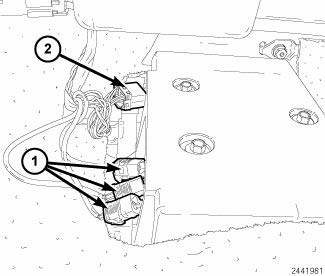
Fig. 8: Antenna & Electrical Connectors
3. Disconnect the three antenna connectors (1) and the electrical connector (2).
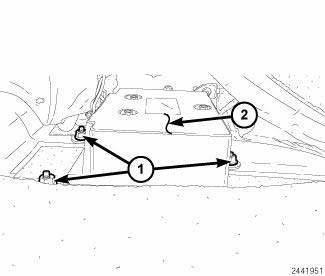
Fig. 9: Retainers & Video Module Housing
4. Remove the three retainers (1) securing the video module housing (2) to the floor, remove video housing and module from vehicle.
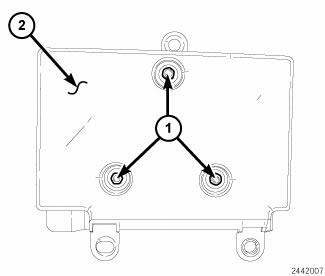
Fig. 10: Video Module Retainers & Video Module Housing
5. Remove the video module retainers (1) to the video module housing (2).
INSTALLATION
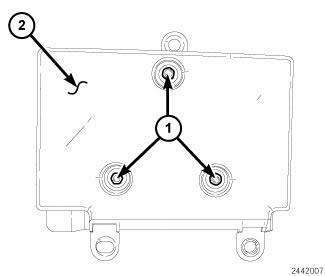
Fig. 11: Video Module Retainers & Video Module Housing
1. Install the video module to the housing.
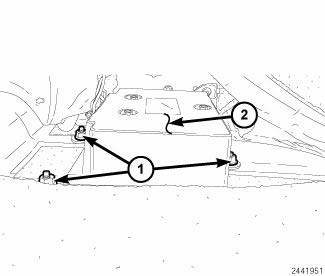
Fig. 12: Retainers & Video Module Housing
2. Install the video module into the vehicle and Install the three retainers (1) securing the video module housing (2) to the floor.
Tighten to 6 N.m (53 in. lbs.).
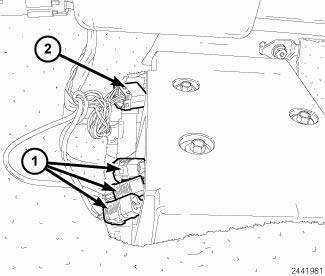
Fig. 13: Antenna & Electrical Connectors
3. Connect the three antenna connectors (1) and the electrical connector (2).
4. Move the front passenger seat back to the original position.
5. Connect the battery negative cable.
 Removal, Installation
REMOVAL
Fig. 6: Backup Camera & Liftgate & Lights
1. Disconnect the negative battery cable.
2. Remove the four retainers (1) holding the lightbar (5) to the liftgate (6).
3. Using a ...
 Monitor, media system
REMOVAL
Fig. 14: Removing / Installing Mounting Fasteners
1. Disconnect and isolate the battery negative cable.
2. Open the video screen to access the mounting fasteners.
3. Remove the mount ...
See also:
Wiring, trailer tow
DESCRIPTION
Fig. 73: Instruction Sheet Are Placed In Glove Box
Vehicles equipped with an optional Trailer Tow Preparation package have a
trailer tow wiring harness and an
instruction sheet (1) ...
40/41TE Transaxle general diagnosis, road test
40/41TE TRANSAXLE GENERAL DIAGNOSIS
NOTE: Before attempting any repair on a 40/41TE four-speed automatic
transaxle,
check for Diagnostic Trouble Codes (DTC's) using the scan tool.
Transaxl ...
MEDIA CENTER 830N (REU) — AM/FM STEREO RADIO AND 6–DISC CD/DVD/HDD/NAV
CHANGER — IF EQUIPPED
NOTE: The sales code is located on the lower right side
of the unit’s faceplate.
The REU Multimedia system contains a radio, Sirius
Satellite Radio player, navigation system, six disc CD/
DVD pl ...
