
Dodge Journey: Link, stabilizer bar
REMOVAL
1. Raise and support the vehicle.
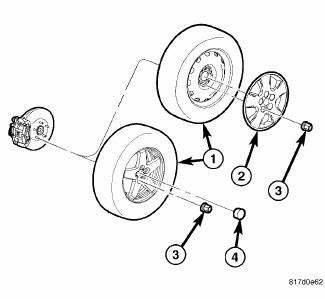
Fig. 60: TIRE AND WHEEL MOUNTING
2. Remove the wheel mounting nuts (3), then the tire and wheel assembly (1).
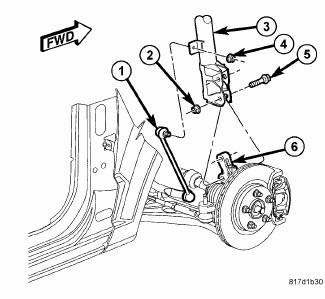
Fig. 61: Strut Mounting To Knuckle
3. While holding the stabilizer bar link (1) stud stationary, remove the nut (4) securing the link to the strut (3).
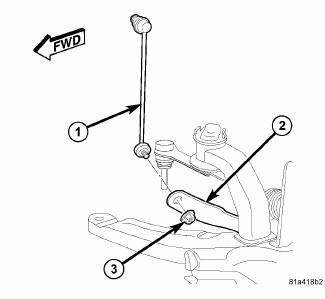
Fig. 62: Stabilizer Link Mounting To Bar
4. While holding the stabilizer bar link (1) lower stud stationary, remove the nut (3) securing the link to the stabilizer bar (2).
5. Remove the stabilizer bar link (1).
INSTALLATION
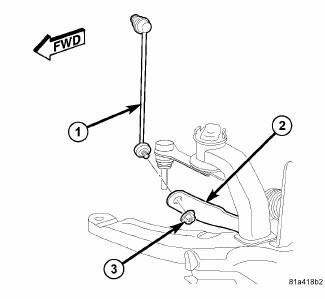
Fig. 63: Stabilizer Link Mounting To Bar
1. Attach the stabilizer bar link (1) to the stabilizer bar (2). Install and tighten the nut (3) while holding the stabilizer bar link lower stud stationary. Tighten the nut to 48 N.m (35 ft. lbs.).
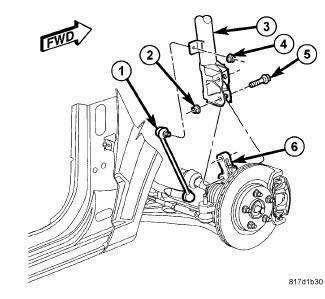
Fig. 64: Strut Mounting To Knuckle
2. Attach the stabilizer bar link (1) to the strut (3). Install and tighten the nut (4) while holding the stabilizer bar link stud stationary. Tighten the nut to 48 N.m (35 ft. lbs.).
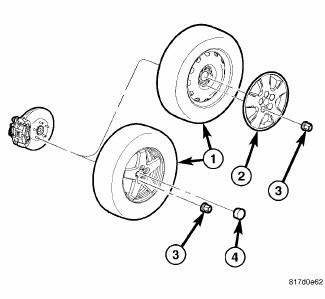
Fig. 65: TIRE AND WHEEL MOUNTING
3. Install tire and wheel assembly (1). Install and tighten wheel mounting nuts (3) to 135 N.m (100 ft. lbs.).
4. Lower the vehicle.
 Installation
Fig. 51: Front Hub And Bearing Mounting
1. If required, install the hub and bearing (1) by sliding it into the
knuckle.
2. If installing hub and bearing, install the four bolts (2) fastening t ...

See also:
Description, Operation
DESCRIPTION
Fig. 2: Antilock Brake Module
- ANTILOCK BRAKE MODULE (ABM)
- HYDRAULIC CONTROL UNIT (HCU)
- PUMP/MOTOR
The Antilock Brake Module (ABM) is a microprocessor-based device which ...
Electrical
SWITCH, BRAKE FLUID LEVEL
Description
The brake fluid level switch (2) is mounted through the center of the fluid
reservoir. The switch can be serviced
separately from the master cylinder fluid r ...
Thermostat
Description
2.0L DIESEL/2.4L ENGINE
Fig. 115: THERMOSTAT
- AIR BLEED
- SEAL
- RETURN SPRING
- PELLET CHAMBER
The primary thermostat for the 2.0L diesel and 2.4L gas engines are locate ...
