
Dodge Journey: Sensor, ambient temperature
DESCRIPTION
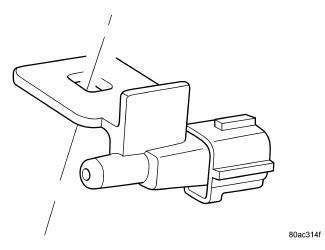
Fig. 33: Identifying Ambient Air Temperature Sensor
The ambient air temperature sensor is a variable resistor that monitors the air temperature outside of the vehicle.
The ATC system uses the sensor data to maintain optimum cabin temperature levels. The ambient air temperature sensor is mounted inside the front fascia.
OPERATION
The ambient air temperature sensor is a variable resistor that operates on a 5-volt reference signal sent by the Totally Integrated Power Module (TIPM). The ambient air temperature sensor is connected to the TIPM through a two-wire lead and connector of the vehicle wire harness. The ambient air temperature sensor changes its internal resistance in response to changes in the outside air temperature, which either increases or decreases the reference signal voltage read by the TIPM. The TIPM converts and broadcasts the sensor data over the Controller Area Network (CAN) IHS bus, where it is read by the ATC A/C-heater control, Powertrain Control Module (PCM) and other vehicle control modules.
The ambient air temperature sensor is diagnosed using a scan tool.
The ambient air temperature sensor cannot be adjusted or repaired and must be replaced if inoperative or damaged.
 Resistor, blower motor, front
DESCRIPTION
Fig. 30: Blower Motor Resistor - Description
A blower motor resistor is used on vehicles equipped with the manual
temperature control (MTC) heating-A/C
system. Vehicles equipped wit ...
 Sensor, evaporator temperature
DESCRIPTION
Fig. 34: Evaporator Temperature Sensor-Description
The evaporator temperature sensor measures the temperature of the conditioned
air downstream of the A/C
evaporator. The evaporator ...
See also:
Heater, engine block
Description
2.4L
Fig. 70: BLOCK HEATER 2.4L ENGINE
- RETAINING CLIP
- BLOCK HEATER
CAUTION: The power cord must be secured in its retainer clips, and
not positioned
so it co ...
Removal
LEFT-HAND-DRIVE
CAUTION: The vacuum in the power brake booster must be pumped down
before
removing the master cylinder to prevent the booster from sucking in any
contamination. This ...
Switch, ignition
DESCRIPTION
This vehicle is equipped with a Wireless Ignition Node (WIN). The WIN, along
with the FOB with Integrated
Key (FOBIK) are the primary components of the keyless ignition system. The onl ...
