
Dodge Journey: REMOTE SOUND SYSTEM CONTROLS — IF EQUIPPED
The remote sound system controls are located on the rear surface of the steering wheel. The left and right-hand controls are rocker-type switches with a pushbutton in the center of each switch. Reach behind the steering wheel to access the switches.
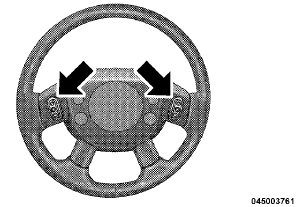
Remote Sound Controls (Back View Of Steering Wheel)
Right-Hand Switch Functions
• Press the top of the switch to increase the volume.
• Press the bottom of the switch to decrease the volume.
• Press the button in the center of the switch to change modes (i.e., AM, FM, etc.).
Left-Hand Switch Functions for Radio Operation
• Press the top of the switch to SEEK the next listenable station up from the current setting.
• Press the bottom of the switch to SEEK the next listenable station down from the current setting.
• Press the button in the center of the switch to tune to the next preset that you have programmed.
Left-Hand Switch Functions for Media (i.e., CD) Operation
• Press the top of the switch once to listen to the next track.
• Press the bottom of the switch once either to listen to the beginning of the current track or to listen to the beginning of the previous track if it is within one second after the current track begins to play.
• Press the switch up or down twice to listen to the second track, three times to listen to the third track, and so forth.
• Press the button located in the center of the switch to change to the next preset that you have programmed.
 UNIVERSAL CONSUMER INTERFACE (UCI) 0.5 — IF EQUIPPED
NOTE: This section is for sales code RES/REL and
REQ/RET radios only with uconnect . For sales code
RBZ/REN/REZ touch screen radio and REU/REX/RE1
radio, refer to the separate User’s Manual.
Thi ...
 CD/DVD DISC MAINTENANCE
To keep a CD/DVD in good condition, take the following
precautions:
1. Handle the disc by its edge; avoid touching the
surface.
2. If the disc is stained, clean the surface with a soft cloth,
wip ...
See also:
Reservoir, brake master cylinder
Removal
CAUTION: If at any time the master cylinder is loosened or
removed, you must
perform the master cylinder installation procedure to ensure that the
seal
(o-ring) is still ...
Assembly
Fig. 257: Installing Input Shaft
- INPUT SHAFT
- ARBOR PRESS
- INPUT SHAFT HUB ASSEMBLY
Use petrolatum on all seals to ease assembly of components.
1. Using an arbor press (2), install ...
Standard Procedure
REFRIGERANT OIL LEVEL
When an A/C system is assembled at the factory, all components except the A/C
compressor are refrigerant oil
free. After the refrigerant system has been charged and operated, ...
