
Dodge Journey: Electrical
SWITCH, BRAKE FLUID LEVEL
Description
The brake fluid level switch (2) is mounted through the center of the fluid reservoir. The switch can be serviced separately from the master cylinder fluid reservoir.
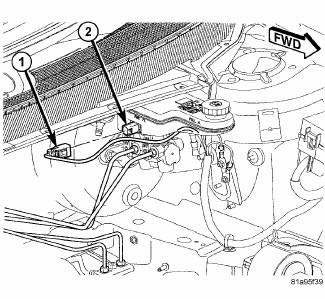
Fig. 12: BRAKE FLUID LEVEL SWITCH CONNECTOR
The brake fluid level switch (2) is mounted through the center of the fluid reservoir. The switch can be serviced separately from the master cylinder fluid reservoir.
Removal
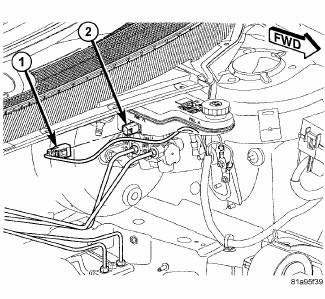
Fig. 13: BRAKE FLUID LEVEL SWITCH CONNECTOR
1. Remove the wiring harness connector (1) from the brake fluid level switch (2) in the master cylinder brake fluid reservoir.
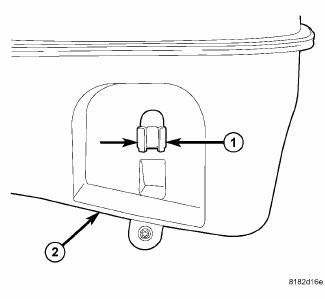
Fig. 14: LEVEL SWITCH RETAINING TABS
2. Push together the retaining tabs (1) that hold the brake fluid level switch in place in the brake fluid reservoir (2).
3. Pull the brake fluid level switch out the right side of the reservoir.
Installation
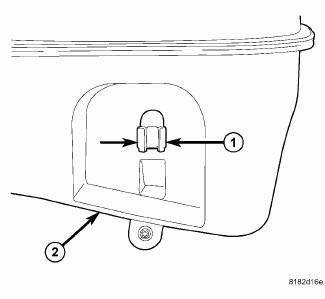
Fig. 15: LEVEL SWITCH RETAINING TABS
1. Align the brake fluid level switch with its mounting hole on the right side of the master cylinder brake fluid reservoir. Push the switch into the fluid reservoir until the switch retaining tabs (1) are expanded on the opposite side of the reservoir (2), locking it in place.
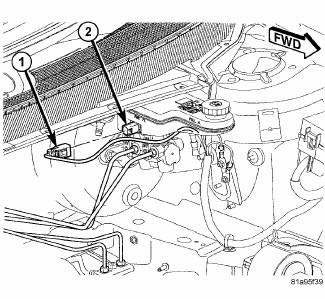
Fig. 16: BRAKE FLUID LEVEL SWITCH CONNECTOR
2. Connect the wiring harness connector (1) to the switch (2).
 Standard procedure
BASE BRAKE BLEEDING
NOTE: This bleeding procedure is only for the vehicle's base brakes
hydraulic system.
For bleeding the antilock brakes hydraulic system.
CAUTION: Before removing t ...

See also:
AUTOSTICK — IF EQUIPPED
AutoStick is a driver-interactive transmission that offers
six manual ratio changes to provide you with more
control of the vehicle. AutoStick allows you to maximize
engine braking, eliminate undes ...
PUBLICATION ORDER FORMS
To order the following manuals, you may use either the
website or the phone numbers listed below. Visa, Mastercard,
American Express, and Discover orders are accepted.
If you prefer mailing your pa ...
Adjustments
ADJUSTMENT
The right and left support assemblies are slotted to allow for right/left
drive train adjustment in relation to drive
shaft assembly length.
Check and reposition right and left engin ...
