
Dodge Journey: Lens, instrument cluster
REMOVAL
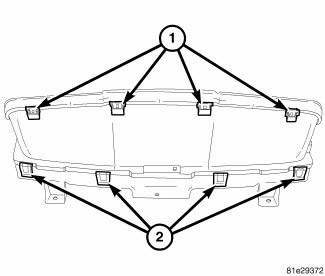
Fig. 8: Instrument Cluster Lens Locking Tabs
1. Remove instrument cluster from vehicle. See Removal .
2. Separate the lens from the cluster by gently prying on the locking clips (1) around the perimeter of the lens.
3. Separate lens from instrument cluster and remove.
INSTALLATION
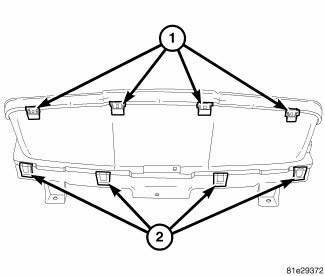
Fig. 9: Instrument Cluster Lens Locking Tabs
1. Align lens locking tabs (1) with instrument cluster mask assembly and snap securely into place.
2. Install the instrument cluster into vehicle.
3. Connect battery negative cable.
 Diagnosis and Testing, Removal, Installation
DIAGNOSIS AND TESTING
INSTRUMENT CLUSTER
As a quick diagnosis, the cluster will perform a functional check of the
odometer display, transmission range
display and warning indicators after the ign ...
 Pod, switch
DESCRIPTION
Fig. 10: Accessory Switch Bank Module
The Accessory Switch Bank Module (ASBM) is located in the center stack area
of the instrument panel just
below the heater and air conditioner d ...
See also:
Resistor, blower motor, rear
DESCRIPTION
Fig. 62: Rear Blower Resistor
A blower motor resistor is used on this model when equipped with the manual
temperature control (MTC) rear
heating-A/C system. Models equipped with the ...
Lifter(s), hydraulic
Diagnosis and Testing
DIAGNOSIS AND TESTING - HYDRAULIC LASH ADJUSTER NOISE DIAGNOSIS
Proper noise diagnosis is essential in locating the source of a NVH
complaint. Locating a lash adjuster (tappe ...
Installation
Fig. 137: Rear Mount Bracket
1. If transmission brackets were removed or transmission was replaced install
the rear mount bracket and
tighten (1) to 100 N.m (74 ft. lbs.).
Fig. 138: Front Mou ...
