
Dodge Journey: Removal
Two unique brake lamp switches are used in this vehicle, depending upon whether the vehicle was built during early or late production. These switches are not interchangeable. Both switches are illustrated and described elsewhere in this service information to assist in positive identification.
EARLY PRODUCTION
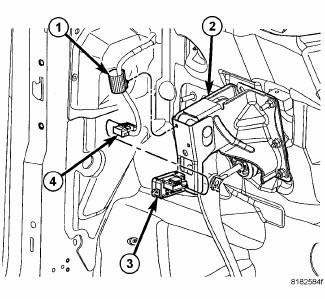
Fig. 62: Stop Lamp Switch Wiring Routing Clip, Brake Pedal Bracket, Stop Lamp
Switch & Wiring
Connector
1. Disconnect and isolate the battery negative cable.
2. If equipped, remove the silencer pad from below the steering column.
3. Locate the brake lamp switch (3) on the brake pedal support bracket (2) under the instrument panel.
4. Disconnect the wire harness connector (4) from the switch.
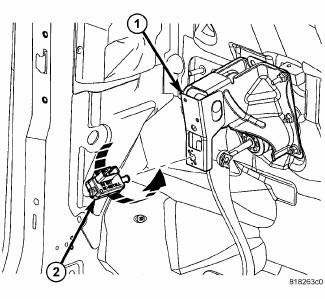
Fig. 63: STOP LAMP SWITCH REMOVAL
1. Rotate the brake lamp switch housing (2) counterclockwise about 30 degrees to align the tabs on the switch locking collar with the keyed hole in the brake pedal support bracket (1).
2. Pull the switch straight rearward from the keyed hole to remove it from the bracket.
3. Discard the removed brake lamp switch. The brake lamp switch self-adjusting plunger is a one time only feature. If the switch is removed from the bracket, it MUST be replaced with a new switch.
LATE PRODUCTION
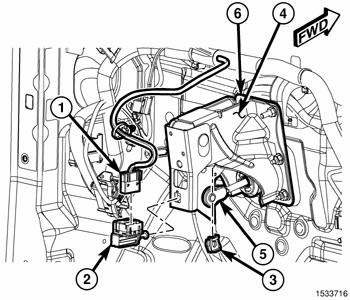
Fig. 64: Brake Lamp Switch On Brake Pedal Support Bracket
1. Disconnect and isolate the battery negative cable.
2. If equipped, remove the silencer pad from below the steering column.
3. Locate the brake lamp switch (2) on the brake pedal support bracket (4) under the instrument panel.
4. Depress and hold the brake pedal in the depressed position.
5. Rotate the brake lamp switch housing (2) counterclockwise about 30 degrees to align the tabs on the switch locking collar with the keyed hole in the brake pedal support bracket.
6. Pull the switch straight rearward from the keyed hole to remove it from the bracket.
7. Release the brake pedal.
8. Disconnect the wire harness connector (1) from the switch.
 Diagnosis and Testing
BRAKE LAMP SWITCH
WARNING: To avoid serious or fatal injury on vehicles equipped
with airbags, disable
the Supplemental Restraint System (SRS) before attempting any steering
wheel, s ...
 Installation
Two unique brake lamp switches are used in this vehicle, depending upon
whether the vehicle was built during
early or late production. These switches are not interchangeable. Both switches
are il ...
See also:
Description, Operation
DESCRIPTION
Fig. 1: Battery Components
This vehicle is equipped with a single 12-volt battery. All of the components
of the battery system are located in
the front of the vehicle, just ahead of ...
Installation
CAUTION: Be certain to adjust the refrigerant oil level when
servicing the A/C
refrigerant system. Failure to properly adjust the refrigerant
oil level will prevent the A/C system fro ...
Description, Operation
DESCRIPTION
Several combinations of radio receivers and speaker systems are offered. The
audio system uses an ignition
switched source of battery current so that the system will only operate when ...
